


 Comments (0)
 3 min Read
By Shaharyar Technologies, May 04, 2026
Rolling out a mobile application is about creating a smooth, engaging experience that keeps users coming back. These days, users expect fast, customized, and reliable solutions. Mobile applications can help you establish trust and increase brand loyalty among consumers who demand all those features. Whether you are a startup company or have already grown and succeeded in your business, you cannot underestimate these applications that now help you provide services.
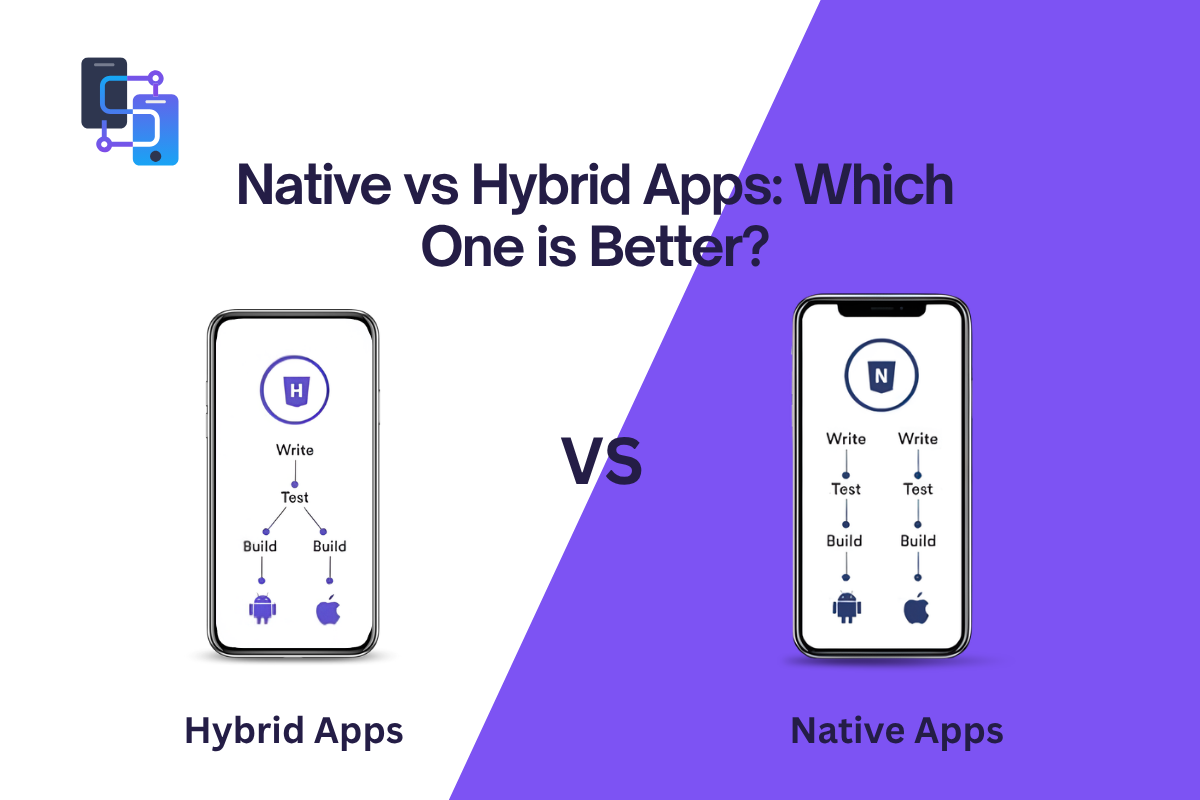
Budget, timeframes, scalability, and future developments are factors to be considered. There are many examples of companies facing challenges combining an app's performance with its cost-efficiency. That is why deciding whether to develop a native app or a hybrid app becomes crucial. Let’s compare both apps' interface and usage and choose the right one.
What are Native Apps?
These applications are developed for only one platform either for Android or iOS. On iOS, programmers can use native programming languages such as Swift and Objective-C, complemented by Apple-provided SDKs.
Native apps are intended to interact directly with hardware and system services. In addition, the native development process implies following platform conventions. This concerns not only navigation patterns, gestures, and typography but also behaviors expected from applications in general.
List of Well-Known Native Apps
There are many applications available on the Internet. We listed down widely used reviews for better understanding. Many of them we mostly use daily.
1. WhatsApp
As we know, WhatsApp is a messaging app that was built natively for Android and iOS. It allows fast texting, voice calls, and media sharing without any hassle.
2. Spotify
As a top-choosing music streaming app that delivers smooth playback and personalized recommendations using native development for better speed.
3. Google Maps
A navigation app that uses device GPS efficiently to provide real-time directions, traffic updates, and location tracking.
4. Snapchat
This is a multimedia messaging app known for real-time photo and video sharing.
5. Google Chrome
This web browser provides fast browsing, secure data handling, and seamless syncing.
Features of Native Apps
These applications are defined by how deeply they integrate with the operating system. They have several helpful features that we mentioned below.
1. High Performance
As these applications are tailored to run on particular platforms, they perform efficiently and respond faster. Moreover, such applications can handle complex tasks effortlessly while reducing lag time.
2. Improved User Experience
They adhere to the rules set by specific platforms, thereby providing a user-friendly application. Smooth navigation through the application and its fast loading times make users happier.
3. Full Usage of Device Features
Developers can take full advantage of device capabilities when creating applications as they will have full access to device resources.
4. Secure and Safe
Developed with official tools and frameworks, native applications provide higher levels of security and safety during operation.
5. Offline Functionality
This is one more feature of native applications. You can use it anytime or anywhere.
What are Hybrid Apps?
Hybrid apps are mobile applications built with web technologies such as HTML, CSS, and JavaScript, then wrapped in a native container. All of the mentioned languages include embedded browsers; therefore, when people download hybrid apps, they actually download a web page that acts like a native app.
These applications have their own characteristics because hybrid applications consist of a native wrapper and a web page. Since hybrid apps do not include many of the components of a native application, they use web languages for the back-end and native languages for the front-end.
List of Popular Hybrid Apps
Many hybrid apps we use in our daily routine. We note the day-to-day downloads of applications.
1. Twitter (X)
Uses hybrid technology to deliver updates, posts, and interactions across platforms efficiently while maintaining good performance.
2. Uber Eats
A food delivery app that combines web and native features to provide smooth ordering and tracking experience.
3. Gmail
Uses hybrid elements to ensure cross-platform compatibility and easy updates.
4. Instagram (early versions)
Initially used hybrid elements to speed up development and maintain consistency across platforms.
5. Evernote
A note-taking app that uses hybrid development to sync data across devices with minimal effort.
Features of Hybrid Apps
These applications come with advanced functionality, some of their top features are discussed below.
1. Multi-platform Compatibility
Using a single codebase to develop hybrid apps means the app will run on various platforms without difficulty.
2. Quick Development
Hybrid app development will be faster because a single code base can be used, eliminating the need to develop separate apps for different platforms.
3. Cost-Effective
Hybrid apps will save on development costs due to lower resource costs. They are good for startups.
4. Easy Maintenance
Updates can be applied once and reflected across all platforms. It simplifies maintenance and reduces long-term effort.
5. Internet Availability
Most hybrid apps require a stable internet connection to function properly.
Which One is Best: Native or Hybrid?
It depends on what you need from your application in the future; you may choose either a native application, which is an effective and functional product, or a hybrid one, which is an efficient development approach. Native applications should be chosen for performance and user experience, but hybrid applications should be chosen for speed and budget efficiency.
Conclusion
Hope this guide helps you distinguish between the two apps and make the right decision. No matter which approach you choose, it is important to have an experienced and reliable partner behind you. Shaharyar technologies is available for new mobile app development projects, and yours might become our next success story.
 Aug 20, 2026

Leave A Comment